
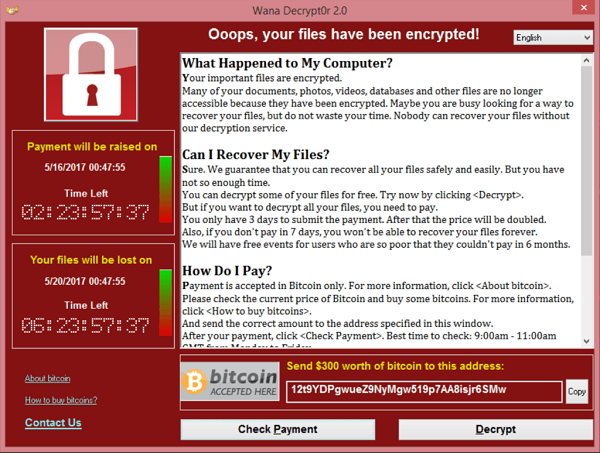
 Your PC is vulnerable to the infamous “WannaCry” ransomware worm which uses an attack known as “DoublePulsar”. The affected PC is running an old version of Windows File and Printer Sharing which contains a serious bug. Attackers can infect your PC over the network without your knowledge and install malware remotely. This is what enabled the WannaCry (WanaCrypt0r) ransomware to infect thousands of computers worldwide on May 12th, 2017
Below, Microsoft provides catalogs and patches for secure protection.
- Download the patch tool from Microsoft and save it to your desktop:» Go to download for Windows XP Service Pack 3
- Disconnect your PC from the network (disconnect the network cable, turn off WiFi).
- Restart the PC.
- Run the installer you saved to your desktop .
- Restart the PC to complete the patch installation process.
- Reconnect to the network.
- Download the patch tool from Microsoft and save it to your desktop:» Go to download for Windows Vista Service Pack 2
- Disconnect your PC from the network (disconnect the network cable, turn off WiFi).
- Restart the PC.
- Run the installer you saved to your desktop .
- Restart the PC to complete the patch installation process.
- Reconnect to the network.
- to confirm that the system is no longer vulnerable.
- Download the patch tool from Microsoft and save it to your desktop:» Go to download for Windows 7
- Disconnect your PC from the network (disconnect the network cable, turn off WiFi).
- Restart the PC.
- Run the installer you saved to your desktop.
- Restart the PC to complete the patch installation process.
- Reconnect to the network.
- to confirm that the system is no longer vulnerable.
- Download the patch tool from Microsoft and save it to your desktop:» Go to download for Windows 8 32-bit | Windows 8 64-bit | Windows 8.1
- Disconnect your PC from the network (disconnect the network cable, turn off WiFi).
- Restart the PC.
- Run the installer you saved to your desktop.
- Restart the PC to complete the patch installation process.
- Reconnect to the network.
- Download the patch tool from Microsoft and save it to your desktop:» Go to download for Windows 10 | Windows 10 Version 1511 | Windows 10 Version 1607
- Disconnect your PC from the network (disconnect the network cable, turn off WiFi).
- Restart the PC.
- Run the installer you saved to your desktop in.
- Restart the PC to complete the patch installation process.
- Reconnect to the network.