Kreu Bota Afrike Kompjuteri juaj është i prekshëm ndaj krimbit famë keq “WannaCry” ,Si mund...

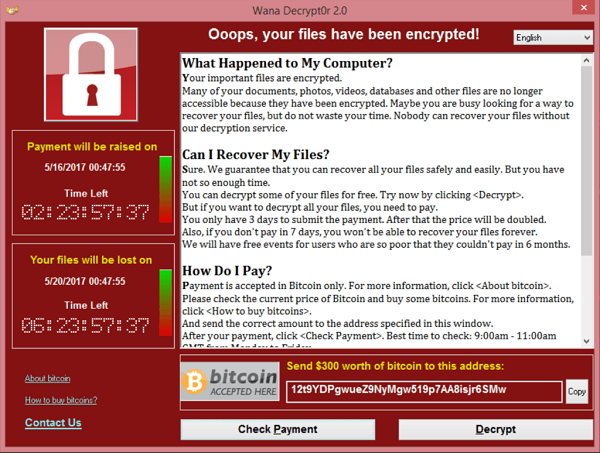
 Kompjuteri juaj është i prekshëm ndaj krimbit famë keq “WannaCry” që përdor një sulm të njohur si “DoublePulsar”. PC-ja e prekur që drejton një version të vjetër të skedarit te Windows dhe skedarit te Printerit që përmban një bug serioz. Sulmuesit mund të infektojnë PC tuaj mbi rrjetin pa dijeninë tuaj dhe instaloni malware në distancë. Kjo është ajo që i mundësoi Ransomware WannaCry (WanaCrypt0r) që të infektojë mijëra kompjuterë në mbarë botën.
Me poshte Microsoft Ofron kataloget dhe Patch-et per nje mbrojtje te sigurte,jo vetem per krimbin WannaCry por dhe per shume probleme te tjera qe mund te demtoje paisjen dhe cfare eshte me e rendesishme materialet numerike.
Windows Xp
- Download the patch tool from Microsoft and save it to your desktop:» Go to download for Windows XP Service Pack 3
- Disconnect your PC from the network (disconnect the network cable, turn off WiFi).
- Restart the PC.
- Run the installer you saved to your desktop .
- Restart the PC to complete the patch installation process.
- Reconnect to the network.
Windows Vista
- Download the patch tool from Microsoft and save it to your desktop:» Go to download for Windows Vista Service Pack 2
- Disconnect your PC from the network (disconnect the network cable, turn off WiFi).
- Restart the PC.
- Run the installer you saved to your desktop .
- Restart the PC to complete the patch installation process.
- Reconnect to the network.
- to confirm that the system is no longer vulnerable.
Windows 7
- Download the patch tool from Microsoft and save it to your desktop:» Go to download for Windows 7
- Disconnect your PC from the network (disconnect the network cable, turn off WiFi).
- Restart the PC.
- Run the installer you saved to your desktop.
- Restart the PC to complete the patch installation process.
- Reconnect to the network.
- to confirm that the system is no longer vulnerable.
Windows 8
- Download the patch tool from Microsoft and save it to your desktop:» Go to download for Windows 8 32-bit | Windows 8 64-bit| Windows 8.1
- Disconnect your PC from the network (disconnect the network cable, turn off WiFi).
- Restart the PC.
- Run the installer you saved to your desktop.
- Restart the PC to complete the patch installation process.
- Reconnect to the network.
Windows 10
- Download the patch tool from Microsoft and save it to your desktop:» Go to download for Windows 10 | Windows 10 Version 1511 | Windows 10 Version 1607
- Disconnect your PC from the network (disconnect the network cable, turn off WiFi).
- Restart the PC.
- Run the installer you saved to your desktop in.
- Restart the PC to complete the patch installation process.
- Reconnect to the network.